Download ShiftGrid
Available for Windows 10 and 11. Free 14-day trial included.
Stay in the loop
Get notified about new releases, tips, and updates.
Optional — no signup required to download.
System Requirements
- Windows 10 or 11 (64-bit)
- 4 GB RAM minimum (8 GB recommended)
- 100 MB available disk space
- No additional runtime required — everything is bundled
Installation
- Download the installer (.exe) from the link above
- Run the installer — if Windows shows a SmartScreen warning, see below
- Follow the installer prompts
- Launch ShiftGrid from your Start menu or desktop shortcut
- Start your 14-day free trial — no account required
Windows SmartScreen Warning
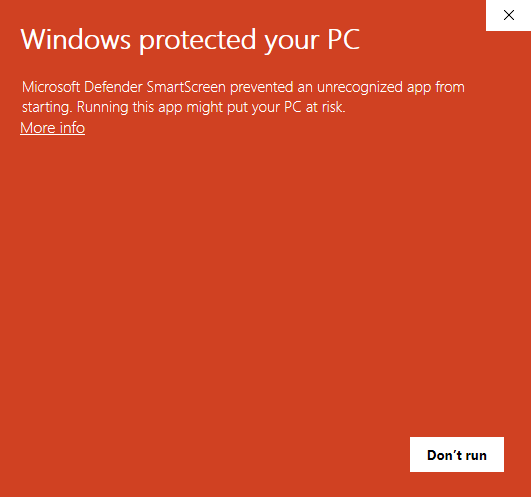
Because ShiftGrid is new software, Windows may show a SmartScreen warning when you first run the installer. This is normal for newly released applications and does not mean the software is unsafe. Follow these two steps to proceed:
Step 1: Click "More info"
Step 2: Click "Run anyway"
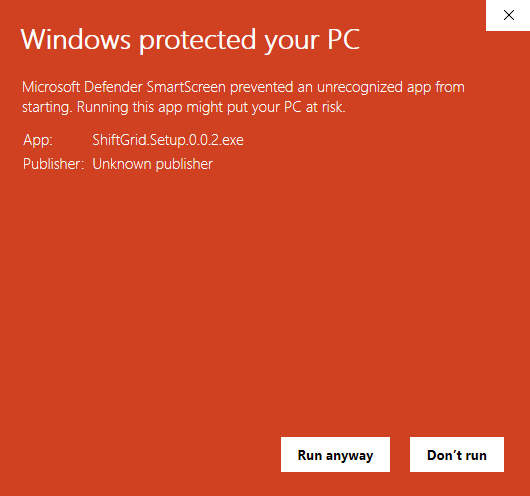
This warning only appears on the first install. ShiftGrid is safe, open-source-installer based, and does not collect or transmit any data from your computer.
Need Help Getting Started?
Check out our features page or reach out for support.